Creating a seamless user experience across devices is more important than ever today. Your website must look good and function properly, whether someone is browsing on a smartphone, tablet, or desktop. As such, understanding standard web page design sizes and resolutions is key to achieving this goal.
In this article, we will explore the best practices for web page design size and resolution. You will learn why responsive design is critical, how different screen sizes impact layout, and how to optimize your site for speed, performance, and SEO.
Understanding Standard Web Page Dimensions
Choosing the right dimensions for your web page starts with understanding the variety of devices users rely on. Standard webpage dimensions are not fixed because screens come in all shapes and sizes. From small smartphones to large desktop monitors, every device needs a slightly different layout. Responsive and adaptive design principles ensure that a website adjusts beautifully, no matter the screen size. Mastering webpage sizing is a must-have skill for every web designer and developer today.

Standard Website Dimensions and Layout Tips
Here are some useful tips for optimizing your web page dimensions for different screens and browser windows:
- Ideal Range for Desktop Screens: For desktop layouts, the ideal width range falls between 1280×720 and 1440×900 pixels. These dimensions ensure your site looks good on most screens without overwhelming users or forcing them to scroll horizontally. The goal is to accommodate various screen sizes while keeping the content well-organized.
- Ideal Range for Laptop Screens: The ideal range for laptop screens is typically between 1366×768 and 1920×1080 pixels. Designing for this range ensures compatibility across most laptops, providing a smooth user experience with responsive layouts.
- The Mobile-First Approach: One of the best practices in web design is to use a mobile-first approach. Begin designing for mobile screens and then scale up to larger devices like tablets and desktops. This ensures that your website is optimized for the most common device and adapts seamlessly to other screen sizes.
- Tablet Considerations: For tablet devices, which typically range from 768px to 1024px in width, it’s important to adjust your layout to ensure a good balance between text, large images, and functionality. Tablets have a unique screen size, often offering more space than mobile phones but less than desktops, so layout adjustments may be necessary to ensure everything remains readable and accessible.
Lastly, always consider user behavior and device usage trends when finalizing your page dimensions. If you’re targeting a mobile-heavy audience, you might prioritize smaller screen sizes in your design. Likewise, if most of your users are on desktops, you might optimize for larger screens first.
Read more: Designing a Standard Content Wide Website
The Importance of Screen Resolutions in Web Design
Understanding popular screen resolutions is crucial when designing a website. Screen resolution determines how much content fits on a user’s device, directly influencing layout, readability, and overall design aesthetics. Without proper attention to resolution, a site might look perfect on one screen but broken on another.

- Common Desktop Screen Widths: Over the years, certain desktop widths have become industry standards. Traditionally, web designers have focused on widths like 1024 pixels, 1280 pixels, and 1920 pixels. These dimensions ensure a comfortable viewing experience for the majority of desktop users.
- Typical Mobile Screen Widths: When it comes to mobile devices, things are a bit different. A width of 360 pixels is often considered standard for mobile version. However, as technology advances, newer smartphones now feature resolutions such as 390 x 833 pixels. Therefore, it’s important to accommodate a range of mobile screen sizes.
- Role of Responsive Design: Responsive web design bridges the gap between different devices. It ensures that your website not only looks great but also functions flawlessly, whether it’s viewed on a tiny smartphone or a massive 4K desktop monitor. Thus, embracing responsive design is key to maintaining a consistent user experience across all platforms.
Learn about: Pixel Perfect Design Best Practices
Aspect Ratios in Web Page Design Size Resolution and Their Impact
Aspect ratios significantly affect how content is displayed across different devices. Whether it’s an image, video, or layout, the aspect ratio determines the width-to-height relationship. Understanding aspect ratios ensures your site’s content looks well-proportioned and functions correctly across various devices. Here’s what you need to know.

Common Aspect Ratios: 16:9 and 4:3
Some of the most common aspect ratios include 16:9 (widescreen) and 4:3 (standard). The 16:9 ratio is ideal for videos, making it the most popular aspect ratio for modern devices, especially large screens like TVs and desktops. On the other hand, 4:3 is often used for older or more square-shaped screens, like traditional computer monitors and some tablets.
Designing for Flexibility Across Aspect Ratios
When designing for different screens, it’s important to create flexible layouts that can adapt to various aspect ratios. This ensures that your content looks consistent and well-proportioned, regardless of the device. For instance, images should scale smoothly without stretching or distorting, while videos should fit correctly on all screen sizes.
Responsive Frameworks for Aspect Ratio Handling
Responsive frameworks like Bootstrap offer built-in tools to manage aspect ratios. These tools automatically adjust elements, ensuring your website’s layout adapts fluidly to different screen sizes and aspect ratios.This makes it easier for designers to create adaptable, user-friendly websites with responsive images without worrying about manual adjustments for every screen size.
Know more: Best Width for Website to Optimize User Experience
Web Page Design Size Resolution: Designing for Desktop Screens
When designing for desktop users, understanding common screen sizes is essential. Desktop resolutions vary, but some standards dominate the landscape. Creating layouts that adapt smoothly across these variations helps deliver a consistent and enjoyable user experience.
- Common Desktop Screen Resolutions: Desktop screens commonly display at 1920×1080 pixels, which is considered the standard full HD resolution. However, other popular sizes like 1366×768 and 2560×1440 are frequently used as well. Therefore, it’s important to design with flexibility in mind.
- Best Practices for CSS Width: For optimal scalability, it’s best to set a maximum width of 100% in your CSS. This approach ensures that your design can stretch or shrink depending on the user’s screen without breaking the layout.
- Using Fluid Grids and Flexible Layouts: Next, adopting fluid grids and flexible layouts allows your design to adapt seamlessly. Rather than fixed dimensions, fluid layouts scale proportionally, offering a better experience on different screen sizes.
- Testing Across Various Desktop Sizes: Finally, always test your design across multiple desktop screen resolutions, especially larger monitors. Early testing can catch layout issues that might only appear at very wide or very narrow widths, saving you time and hassle later.
Check out: Common WordPress Website Design Mistakes to Avoid
Web Page Design Size Resolution: Designing for Smaller Screens
Smaller screens, like those on smartphones and tablets, require special design strategies. Since space is limited, it’s crucial to prioritize clarity, simplicity, and ease of use. Making thoughtful design choices ensures users enjoy a seamless experience, even on compact devices.

- Optimizing Font Sizes for Readability: Make sure to adjust font sizes for smaller screens and full screen. Text should remain easy to read without requiring users to zoom in. Ideally, maintain a minimum font size of 16px for body text to enhance readability.
- Applying CSS Media Queries for Breakpoints: Use CSS media queries to modify layouts at strategic breakpoints, such as 768px for tablets and 480px for mobile phones. This technique allows the design to shift and adapt depending on the screen size, ensuring consistent usability.
- Prioritizing Essential Content: Focus on the most important content. Users on smaller screens want quick access to key information. Therefore, avoid clutter and streamline the user journey as much as possible.
- Using Collapsible Menus and Simplified Navigation: To save valuable space, implement collapsible menus and minimalistic navigation. This keeps the interface clean while still offering full functionality when users need it.
Also read: Best Examples of Triadic Color Schemes to Craft Vibrant Design
Why Mobile Web Design Matter and Key Principles of Responsive Web Design
Mobile devices demand a mobile-first design approach. Today, most web traffic comes from mobile users, making it even more important to prioritize mobile responsiveness. Here are some best practices:
- Design for a base width of 360 pixels.
- Consider newer mobile resolutions like 390 x 833 pixels.
- Focus on simple navigation and easy readability.
- Keep touch targets large enough for fingers.
A responsive mobile web design helps you capture and keep your audience’s attention.
Key Responsive Design Principles
Responsive web design is more than just a trend; it’s a fundamental approach to modern web development. With users accessing websites from a variety of devices, responsive design ensures that your site looks great and functions smoothly, no matter the screen size.
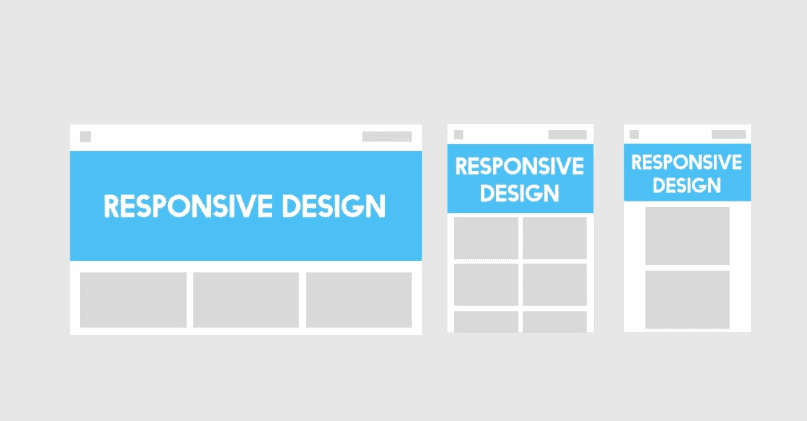
- Flexible Grids: Flexible grids are the backbone of responsive design. These grids automatically adjust based on the screen size, making the layout fluid rather than fixed. This adaptability ensures that content fits neatly, regardless of whether it’s viewed on a smartphone or desktop.
- Fluid Images: Another important principle is fluid images. Rather than using fixed image sizes, fluid images scale within their containing elements. This prevents images from overflowing or distorting, ensuring that they look good across all devices.
- Media Queries: Finally, CSS media queries allow you to apply different styles depending on the device’s characteristics, such as width, height, or orientation. Media queries make your site even more adaptable, letting you fine-tune the design for various screen sizes, from mobile phones to large desktop monitors.
Bonus: Managing Web Design Projects
Project management for web design must start with understanding your audience. Analyze demographics to determine:
- Preferred devices.
- Screen sizes.
- Browsing habits.
By focusing on your target audience’s needs, you’ll create a web design that converts better.
Optimizing Blog Images and Web Design
Images play a big role in web design. However, oversized images can slow down your site. To optimize:
- Choose a 1.59:1 ratio for blog images.
- Compress images without losing quality (tools like TinyPNG or ImageOptim help).
- Use the correct format: JPEG for photos, PNG for graphics.
Optimized images not only improve page speed but also enhance SEO performance.
SEO and Web Page Responsiveness
Google prioritizes mobile-friendly websites in its search results. Hence, a responsive design directly impacts your website traffic and search engine rankings in digital marketing. So, here are some key points to remember when it comes to the screen real estate:
- Ensure fast loading times.
- Design for mobile usability.
- Avoid intrusive popups on mobile screens.
A responsive website not only looks better but also performs better in search rankings.
Web Design Trends and Best Practices
Following current trends can help you stay competitive.
- Design files are usually created at 1920px or 1440px wide.
- Use flexible, modular layouts.
- Make sure interactive elements (like buttons) are easily clickable on all devices.
Keeping your designs simple, clean, and responsive is a winning strategy.
Related: Black Website Design Trends and Inspirations
Web Page Speed and Performance
Page speed is a major ranking factor and user satisfaction metric. To optimize speed:
- Minimize file sizes.
- Compress images.
- Use lazy loading for non-critical content.
Fast-loading pages keep visitors happy and boost your SEO rankings.
Testing and Validation Are Key
Testing your website across multiple devices and browsers is essential. Make sure to:
- Check layout adaptability.
- Validate forms and interactive elements.
- Test page speed.
Don’t skip testing; it’s where many hidden issues reveal themselves.
Web Design Trends and Best Practices
Following current trends can help you stay competitive.
- Design files are usually created at 1920px or 1440px wide.
- Use flexible, modular layouts.
- Make sure interactive elements (like buttons) are easily clickable on all devices.
Keeping your designs simple, clean, and responsive is a winning strategy.
Helpful Tools for Web Designers
Professional web designers use many tools to create responsive, adaptive layouts:
- Figma and Adobe XD for wireframing and prototyping.
- Bootstrap for responsive grids.
- Responsive Testing Tool to check your site’s responsiveness.
Using the right tools makes it easier to ensure that your designs meet modern standards.
Conclusion
Choosing the right web page size and resolution isn’t just about aesthetics. It’s about providing a seamless, enjoyable experience for your visitors. By following best practices for web page design size resolution, you’ll build websites that not only look great but also perform exceptionally well across all devices.
Whether you’re designing a business site, an e-commerce store, or a personal blog, keep your users at the center of your design decisions. This is important as a responsive and optimized website paves the way for higher engagement, better SEO, and lasting success.
FAQs About Web Page Design Size Resolution
What is the best size for a website design?
The best size for a website design is generally 1440px width for desktops. For mobile-first design, focus on widths starting from 360px to 768px for mobile devices.
What is the best image size for a web page?
The best image size for a webpage is typically 1200px wide for full-width images. Ensure images are optimized for the web, with a resolution of 72 DPI to balance quality and loading speed.
What is the most common screen resolution of a website page?
The most common screen resolution of a website page is 1440px wide for desktops, as it provides a good balance for most users. However, designs should be responsive, scaling down to 360px for mobile devices.
Is web design 1440 or 1920?
Web design typically targets 1920×1080 pixels for full HD, But 1440px is also common, especially for designs that aim to accommodate both larger desktop screens and ensure responsiveness.