Spilt Complementary Color Schemes are a great way to add balance and contrast to your website design. They offer the vibrancy of complementary colors but with a softer, more harmonious feel. By choosing a base color and pairing it with two adjacent colors of its complement, you can create visually appealing designs. This approach enhances readability, guides user attention, and makes your website more engaging.
Whether you’re designing a business site or a creative portfolio, using split complementary colors can help establish a professional yet inviting look. Let’s explore how to use this color scheme effectively to elevate your WordPress website design.
Understanding Split Complementary Color Schemes
A split complementary color scheme involves selecting a base color and pairing it with the two colors adjacent to its direct complement on the color wheel.
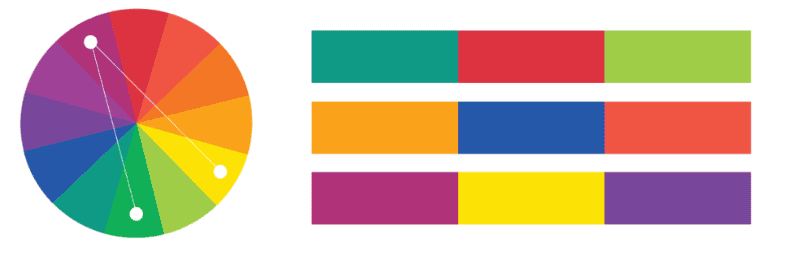
For instance, if your base color is blue, instead of pairing it with its direct complement, orange, you would use yellow-orange and red-orange. This method offers a vibrant yet balanced palette, providing visual interest without the intensity of direct complementary colors.
Examples of Split Complementary Color Schemes
Split complementary color schemes add depth and vibrancy to web design while maintaining harmony. By selecting a base color and pairing it with two adjacent colors of its complement, designers create visually appealing palettes. Here are some great examples to inspire your next project.
- Blue, Yellow-Orange, and Red-Orange: This combination balances the calming effect of blue with the warmth of yellow-orange and red-orange, making it ideal for corporate websites and tech brands.
- Green, Red-Violet, and Red-Orange: Green brings freshness, while red-violet and red-orange add energy, making it perfect for eco-friendly brands and creative portfolios.
- Purple, Yellow-Green, and Yellow-Orange: This scheme is both bold and elegant. It is often used in luxury brands, beauty websites, and fashion stores.
- Orange, Blue-Green, and Blue-Violet: A vibrant and energetic mix, this Split complementary color scheme is great for sports websites, entertainment platforms, and youth-oriented brands.
- Red, Blue-Green, and Yellow-Green: Red conveys passion, while blue-green and yellow-green create balance, making it effective for food websites and marketing agencies.
Ultimate Guide: How Many Tertiary Colors Are There
Benefits of Using Split Complementary Colors
Implementing split complementary colors in web design offers several advantages:
- Enhanced Contrast and Harmony: This scheme provides a pleasing contrast while maintaining harmony, making designs more engaging without overwhelming the viewer.
- Versatility: It is suitable for various design contexts, from minimalist to elaborate styles, which allows for creative flexibility.
- Visual Hierarchy: It helps establish a clear visual hierarchy by using contrasting colors to draw attention to key elements.
How to Create a Split Complementary Color Scheme for WordPress Web Design?
To develop an effective split complementary palette:
- Choose a Base Color: Select a primary color that aligns with your brand or design goals.
- Identify the Complement: Find the direct complementary color of your base hue on the color wheel.
- Select Adjacent Colors: Pick the two colors adjacent to this complement.
- Assign Roles: Use the base color predominantly (about 60%) and the two accent colors for secondary elements (30% and 10%, respectively). This follows the 60-30-10 rule for a balanced design.
Learn about: Best Width for Website to Optimize User Experience
Color Psychology in Split Complementary Schemes
Colors have a powerful impact on emotions and decision-making. In web design, choosing the right colors can influence user behavior, engagement, and overall experience. A well-planned split complementary color scheme enhances visual appeal while aligning with brand messaging. Here’s how different colors affect perception.
Blue – Trust and Stability
Blue is commonly used in corporate and financial websites because it conveys professionalism, reliability, and security. For example, Facebook predominantly uses blue, which conveys trust, stability, and professionalism. It balances this with subtle orange and red accents in notifications and reactions.
Orange – Energy and Excitement

Orange adds warmth and enthusiasm, making it great for call-to-action buttons and entertainment sites. Fanta’s branding revolves around orange, symbolizing energy and fun. It often pairs this with blue-green and blue-violet accents to maintain contrast and balance.
Green – Growth and Harmony
Green symbolizes nature, balance, and health. It is often used for wellness, organic, and environmental websites. Whole Foods Market uses green to represent health and sustainability. It complements this with red-orange and red-violet tones in promotional materials.
Purple – Luxury and Creativity
Purple evokes sophistication and imagination, making it a popular choice for beauty, fashion, and artistic platforms. Cadbury’s signature purple conveys luxury and indulgence, with yellow-green and yellow-orange accents used in branding and packaging.
Red – Passion and Urgency
Red stimulates urgency and excitement. It is often used in sales promotions and food industry branding. YouTube’s red logo triggers excitement and urgency, paired with blue-green and yellow-green hues in its interface for contrast and balance.
By understanding color psychology, you can create a split complementary scheme that enhances user engagement and aligns with your website’s goals.
Check out: The Best Font for Headings
Usage of Split Complementary Colors in WordPress Design
Split complementary colors can make a WordPress website visually appealing, engaging, and easy to navigate. By using a well-balanced color scheme, designers can create contrast without overwhelming users. Many WordPress themes effectively apply this approach to enhance readability, aesthetics, and brand identity. Here’s how you can incorporate these colors into your design.
Popular WordPress Themes That Use Split Complementary Colors
Many WordPress themes incorporate split complementary color schemes to create visually appealing and user-friendly designs. These themes use strategic color combinations to enhance readability, engagement, and brand identity.
With customizable options, they allow designers to apply split complementary colors effortlessly to backgrounds, buttons, and typography. Here are some top themes that effectively use this approach.
Astra – Versatile and Lightweight WordPress Theme

Astra is a highly customizable theme that allows users to experiment with different color schemes. It supports split complementary colors, making it ideal for business websites and portfolios.
OceanWP – Modern and Engaging WP Theme

OceanWP offers various demo templates with vibrant split complementary color palettes. It works well for eCommerce sites, creative agencies, and blogs looking for a balanced yet striking design.
Divi – Highly Customizable
Divi’s visual builder enables designers to create engaging layouts with split complementary colors. Its flexibility makes it perfect for personal brands, agencies, and online stores.
Neve – Minimalist Yet Dynamic Theme

Neve’s sleek and responsive design makes it a great choice for startups and professional websites. Its color settings allow users to mix and match split complementary hues for a polished look.
Hestia – Stylish and Professional WP Theme

Hestia combines modern aesthetics with split complementary color schemes to create visually appealing landing pages. It’s ideal for tech startups, corporate sites, and service-based businesses.
By choosing one of these themes, you can easily implement split complementary colors to create visually appealing websites with harmonious balance and striking contrast.
Know more about: Common WordPress Website Design Mistakes to Avoid for Success
Split Complementary Colors Web Design Ideas and Examples
Split complementary colors offer vibrancy and balance to a WordPress website while maintaining visual harmony. This color scheme offers contrast without being too harsh. By thoughtfully applying these colors, designers can create engaging and professional-looking websites that evoke specific emotions.
Here are some creative ways to implement split complementary colors in WordPress design.
Professional and Inviting – Blue with Yellow-Orange and Red-Orange
As a basic complementary color, a blue background paired with yellow-orange and red-orange accents creates a trustworthy yet dynamic feel. This works well for:
- Corporate websites (e.g., financial services, tech firms)
- Educational platforms (e.g., online learning portals, universities)
- Portfolio sites (e.g., freelance designers, consultants)
Example: A law firm website can use a deep navy blue background with golden-yellow buttons and red-orange highlights for calls to action.
Eco-Friendly and Fresh – Green with Red-Violet and Red-Orange
Green symbolizes nature and growth, while red-violet and red-orange provide contrast without overpowering the design. This combination is perfect for:
- Environmental blogs and NGOs
- Organic product websites
- Health and wellness brands
Example: A sustainable fashion brand can use a soft green background, red-violet typography, and red-orange buttons to create an earthy yet modern look.
Luxury and Elegance – Purple with Yellow-Green and Yellow-Orange
Purple adds sophistication, while yellow-green and yellow-orange create a warm and inviting contrast. This color scheme suits:
- Luxury brands (e.g., jewelry, perfumes)
- Beauty and fashion eCommerce
- High-end interior design websites
Example: A premium skincare website could use deep purple headers, yellow-green navigation elements, and yellow-orange CTA buttons for a rich, elegant feel.
Energetic and Playful – Orange with Blue-Green and Blue-Violet
Orange exudes excitement, while blue-green and blue-violet help balance the intensity. This vibrant combination is ideal for:
- Entertainment and gaming websites
- Children’s educational platforms
- Fitness and sports-related businesses
Example: A gaming website could use a bold orange header with blue-green content blocks and blue-violet hover effects to create an engaging, action-packed look.
Bold and Attention-Grabbing – Red with Blue-Green and Yellow-Green
Red commands attention, while blue-green and yellow-green provide balance and depth. This combination works well for:
- Marketing agencies and advertising firms
- Food industry websites (e.g., restaurants, food delivery apps)
- Event promotion pages
Example: A food delivery service might use a red navigation bar, blue-green background, and yellow-green CTA buttons to stimulate appetite and encourage action.
Find Out: Why Agencies are Turning to White Label WordPress Web Design Services
Implementing Split Complementary Colors in Web Design
Here’s how to implement this color scheme successfully in web design.
- Use the Base Color for Major Elements: The base color should be applied to dominant sections like the background, navigation bar, or hero section. This establishes a consistent and visually cohesive look.
- Use Complementary Colors to Highlight Important Features: The two adjacent complementary colors should be used for accents, such as buttons, links, and call-to-action (CTA) elements. These colors draw attention without overwhelming the user.
- Consider the Psychological Impact of Colors: Colors influence user emotions and behavior. Choosing the right combination ensures your design aligns with your brand message and audience expectations.
- Create Visual Hierarchy and Focus Points: Split complementary colors can help establish a hierarchy by directing users’ eyes to key elements such as headings, CTAs, and featured content.
Check out: WordPress Themes Everything You Need to Know
Best Practices for Using Split Complementary Colors in WordPress
Here are some key guidelines to help you implement this color scheme:
- To prevent visual clutter, follow the 60-30-10 rule. Use 60% for the base color, 30% for the secondary color, and 10% for the accent color.
- Make sure text and background colors contrast well to enhance readability and accessibility. Light text on a dark background or vice versa works best.
- Leverage complementary colors to highlight important elements such as buttons, links, and key content areas.
- Ensure that your split complementary color scheme aligns with your brand identity and messaging. Colors should evoke the right emotions and reinforce brand recognition.
- Colors may appear differently on various screens, so always test your design on multiple devices to ensure consistency.
By following these best practices, you can create a visually harmonious and user-friendly WordPress website.
Also read: How to Build Custom WordPress Themes Through White Label Services
Tools and Plugins for Creating Split Complementary Color Schemes
Below are some of the most effective tools and plugins to assist you in creating a visually appealing color palette.
Color Wheel
A color wheel is a fundamental tool for choosing colors that complement each other. It allows you to visually map out complementary colors and their adjacent hues for split complementary schemes.
Online Color Picker Tools
Online color pickers, like Coolors or Adobe Color, enable you to easily select and experiment with split complementary color combinations. These tools help you find harmonious colors quickly and efficiently.
Design Software (Figma, Adobe XD)
Design platforms like Figma and Adobe XD provide color selection tools and live previews. They allow you to test and adjust your split complementary color schemes directly on your web design projects.
Chrome Extensions for Color Picking
Extensions like ColorZilla and Eye Dropper allow you to pick colors directly from websites and images. This is useful for quickly capturing colors and experimenting with split complementary schemes without leaving your browser.
Plugins for WordPress
There are several plugins, such as WP Color Palette and ACF RGBA Color Picker, that can help you apply and modify your split complementary color scheme directly within WordPress. These tools provide easy access to color selections within the theme customizer.
Color Scheme Generators
Tools like Colormind can generate color palettes based on input from images or your selected color themes. These generators are useful for discovering new split complementary color combinations that work well together.
Online Resources and Tutorials
There are numerous online resources and tutorials available to guide you in learning more about color theory and split complementary color schemes. Websites like Canva and Seahawk Media offer valuable insights and tips for improving your color selection process.
Split Complementary Color Schemes: Common Mistakes to Avoid
While split complementary color schemes can enhance a website’s design, they require careful implementation to avoid common pitfalls. Understanding and avoiding these mistakes ensures that your design remains visually balanced, readable, and user-friendly. Below are some of the most common mistakes to watch out for when using this color scheme.
Using Too Many Colors
It’s easy to get carried away when experimenting with colors, but using too many colors in your design can overwhelm visitors. Too many colors can create confusion, diminish focus, and result in a cluttered layout.
Tip: Stick to the core split complementary palette and use other colors sparingly to maintain harmony.
Not Ensuring Sufficient Contrast for Readability
Colors that don’t contrast enough can make text difficult to read. For example, light text on a light background or dark text on a dark background can strain the eyes.
Tip: Ensure that text stands out clearly from its background by adjusting the contrast levels appropriately, particularly for body text and headings.
Using Colors That Clash or Are Too Similar
Even though split complementary colors are designed to work well together, it’s essential to avoid using hues that clash or are too similar, as this can create visual discord.
Tip: Test your color combinations and make sure there’s enough variation between them to create contrast while still maintaining balance.
Overcomplicating the Palette
One of the advantages of split complementary colors is their ability to create harmony with a few well-placed colors. However, overcomplicating your palette by introducing too many shades or additional accent colors can defeat the purpose.
Tip: Focus on a strong base color and use the complementary colors to highlight essential elements, keeping the design streamlined.
Ignoring Color Psychology
Colors evoke emotions and influence user behavior. Neglecting the psychological impact of colors can result in a design that doesn’t align with your brand or intended message.
Tip: Consider the psychological meaning of your base and complementary colors to ensure they evoke the right emotions and user response for your website’s goals.
Further reading: Top Trends in WordPress Website Design
Bonus Resource: Working with Primary Colors and Secondary Colors
When designing with split complementary color schemes, it’s important to understand how primary and secondary colors work to build a balanced and harmonious color scheme. Here’s how to incorporate them into your split complementary design.

Primary Colors: The Foundation of Color Schemes
Primary colors—red, blue, and yellow—are the building blocks of all other colors. These colors are pure and cannot be created by mixing any other hues.
Tip: Choose one primary color as your base color for the split complementary color scheme to ensure the design has a strong foundation.
Secondary Colors: Mixing Primary Colors Together
Secondary colors—green, orange, and purple—are created by mixing two primary colors. These colors add vibrancy and complexity to your design.
Tip: Use secondary colors adjacent to the complementary color of your base primary color. For instance, pairing blue (primary) with orange (secondary) creates a dynamic contrast that works well for split complementary schemes.
Creating a Split Complementary Color Scheme with Primary and Secondary Colors
In a split complementary color scheme, the base color is paired with the two colors adjacent to its complementary counterpart. This allows you to use both primary and secondary colors effectively.
Tip: If your base color is blue, the complementary color would be orange. The adjacent colors to orange, yellow-orange, and red-orange, can be used for accents, creating a balanced, harmonious design.
Balancing Primary and Secondary Colors in Your Design
While both primary and secondary colors are important, it’s essential to strike a balance. Too many secondary colors can overpower the design, while too few can make it feel flat.
Tip: Use primary colors for large sections or backgrounds, and secondary colors to accentuate smaller elements such as buttons, headings, and icons.
Test and Adjust Your Palette
When working with primary and secondary colors, always test how they interact with one another in your design. What works well on the color wheel may not always translate perfectly on screen.
Tip: Experiment with different tones and shades of both primary and secondary colors to find the best combination for your design’s mood and style.
Exploring Color Combinations and Schemes
Here’s a closer look at some popular color schemes and how they work together:
Analogous Color Schemes: Analogous color schemes consist of colors that sit next to each other on the color wheel. These schemes are harmonious and create a serene, cohesive look.
Tip: Use analogous color schemes when you want a subtle, blended effect. For example, blue, blue-green, and green can create a smooth, calming gradient.
Complementary Color Schemes: Complementary color schemes involve selecting two colors that are opposite each other on the color wheel. This creates a high contrast, vibrant effect.
Tip: Complementary colors are perfect for making elements stand out. For instance, pairing red with green brings a striking, bold contrast.
Split Complementary Color Schemes: Split complementary color schemes build on complementary colors by selecting one base color and the two colors adjacent to its complementary color. This combination offers high contrast while maintaining harmony.
Tip: This scheme balances vibrant contrasts with a more accessible aesthetic. For example, if the base color is blue, you could use yellow-orange and red-orange as complementary accents.
Experimenting with Different Color Combinations: Exploring and experimenting with various color combinations can help you find the perfect palette for your design. Don’t be afraid to mix and match to see what works best.
Tip: Adjust saturation and brightness levels to fine-tune your color combination’s overall look and feel.
Color Theory: Building a Color Palette
Building a color palette involves selecting colors that work well together and support the desired mood and message of the design. A well-thought-out palette ensures that all elements come together cohesively. Here are some tips for creating a balanced color palette:

Using the Color Wheel: The color wheel is an essential tool when selecting colors that complement each other. It helps designers visualize relationships between colors, such as complementary, analogous, and split complementary.
Consider the 60-30-10 Rule: This popular design rule suggests using 60% of the base color, 30% of a secondary color, and 10% for accent colors. This ratio creates a balanced, visually appealing design.
Creating a Harmonious and Balanced Palette: A color palette should feel cohesive and balanced. By combining colors that complement each other, such as split complementary colors, you can ensure a visual flow across the design.
Tip: Adjust the color tones, saturation, and brightness to create a harmonious and balanced palette that works for your brand and message.
Trends and Innovations in Color Usage
Color trends constantly evolve, and staying updated with the latest innovations can inspire fresh web and graphic design ideas. Exploring new ways to use color allows designers to stay relevant and create bold, engaging designs. Here are some trends and ideas for experimenting with split complementary colors.
Bold and Vibrant Colors: Many current trends focus on using bold, vibrant colors to make a statement. Combining split complementary colors in bold tones can create a striking effect.
Tip: Try incorporating vivid hues such as electric blue with neon orange for a modern, attention-grabbing design.
Creating Depth and Dimension: Using split complementary colors can enhance the perception of depth on a page, making it feel more dynamic. By layering colors and experimenting with opacity, you can achieve a more three-dimensional look.
Tip: Apply split complementary colors in different shades or opacities to add depth, especially on backgrounds or large sections of your website.
Monochromatic Colors with a Pop of Complementary Colors: While split complementary colors work well together, sometimes incorporating a subtle monochromatic base color with complementary accents creates a clean, modern design.
Tip: Use a gradient of a single base color (e.g., different shades of blue) and add a pop of an adjacent complementary color for emphasis and interest.
To Sum Up
Incorporating split complementary color schemes into your website design can significantly enhance both its aesthetic appeal and overall user experience. By thoughtfully selecting and applying these colors, you not only create a visually engaging and harmonious interface but also ensure that your design stands out.
Moreover, using this color scheme allows for high contrast and visual interest without overwhelming the viewer. As a result, your website will look both professional and inviting. When combined with careful attention to color psychology and hierarchy, split complementary colors can help guide users’ attention, improving functionality and usability.
Spilt Complementary Color Schemes FAQs
Do split complementary colors look good together?
Yes, they offer a balanced contrast that is visually appealing without being overwhelming.
What is the 60-30-10 rule for website design?
It’s a guideline for color distribution: 60% dominant color, 30% secondary color, and 10% accent color, ensuring a balanced and cohesive look.
How do you use complementary colors in web design?
Complementary colors, positioned opposite each other on the color wheel, can be used to create high-contrast and vibrant designs that draw attention to key elements.
Why do artists use split complementary colors?
Artists employ this scheme to achieve visual interest and harmony, offering contrast without the stark intensity of direct complements.
How do complementary pairs, including warm colors and cool colors, work together?
Complementary pairs, including warm (red, orange, yellow) and cool colors (blue, green, purple), create contrast and vibrancy. When used together, they balance each other, with warm colors evoking energy and cool colors providing calm. These two split complementary colors enhance visual appeal, draw attention, and add harmony to designs.
What is a color wheel in web design?
A color wheel in web design is a visual tool that organizes colors around a circle to show relationships between primary, secondary, and tertiary colors. It helps designers create harmonious, visually appealing, and eye catching color combinations.
Would blue-purple, red-purple, and blue-green-orange work in split complementary colors?
Not exactly. Split complementary schemes involve a base color and the two adjacent to its direct complement. Blue-purple and red-purple could be adjacent, but adding blue-green-orange (which combines two different hues) disrupts the harmony. It’s better to simplify and follow true split-complementary rules for balance.
Which color palette for visually impaired users can be used for cohesive design?
High-contrast color palettes, such as dark blue on white or black on yellow, work well for visually impaired users. Avoid red-green combinations and use textures or patterns for additional differentiation.
Can yellow-purple and red-yellow-orange cause visual tension?
Yes, this combination can cause visual tension due to high contrast and conflicting warm-cool tones. Yellow and purple are complementary, while red-yellow-orange introduces a third, warm color that may clash if not carefully balanced.
How to create a visual balance between blue-purple, orange, and yellow in web design?
To create balance, use one dominant color (e.g., blue-purple), one secondary (e.g., orange), and one as an accent (e.g., yellow). Apply the 60-30-10 rule, maintain consistent saturation levels, and use whitespace to soften visual intensity.
Do yellow, orange, blue, and purple offer more contrast, or are they direct opposites?
These colors offer strong contrast, but they are not all direct opposites. Yellow and purple are complementary, as are blue and orange. Pairing both complementary sets increases vibrancy, which can be impactful but requires careful balance to avoid overstimulation.