Have you ever looked at a color and wondered how it was created? Colors are more than just red, blue, and yellow. Between these primary colors lie beautiful in-between hues called intermediate colors. These colors play a vital role in art, website design, fashion, and everyday life.
Understanding intermediate colors helps you mix colors effectively, create stunning designs for websites, and bring harmony to visual compositions. In this guide, we’ll explore what intermediate colors are, how they are created, and how to use them in different color schemes.
1. Understanding Color Basics
Before diving into intermediate colors, it’s important to understand some basic color theory.

Color Theory and the Color Wheel
Color theory is the study of how colors interact with each other. The color wheel is a circular diagram that organizes colors in a way that shows their relationships.
- Primary colors: Red, yellow, and blue. These colors cannot be created by mixing other colors.
- Secondary colors: Green, orange, and purple. These are created by mixing two primary colors.
Knowing how primary and secondary colors interact is essential for understanding intermediate colors.
Intermediate and Tertiary Colors
Intermediate colors (also called tertiary colors) are created by mixing a primary color with a neighboring secondary color. These colors appear between primary and secondary colors on the color wheel.
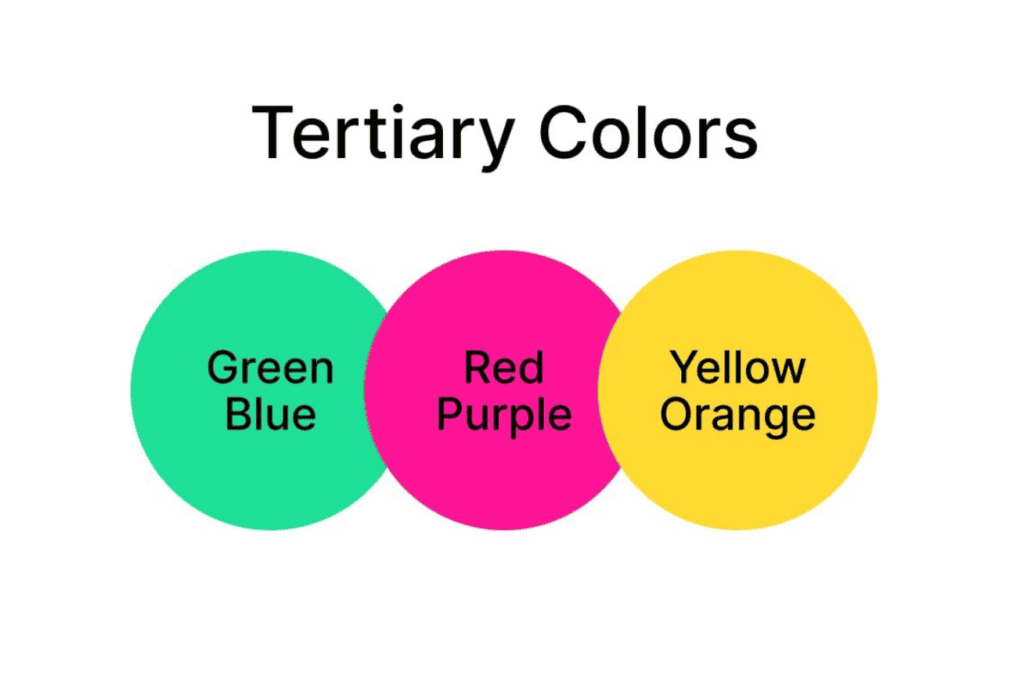
For example:
- Yellow + Orange = Yellow-Orange
- Blue + Green = Blue-Green
- Red + Violet = Red-Violet
Each intermediate color takes on characteristics of both the primary and secondary colors that created it. This results in a wide range of unique hues.
2. Intermediate Colors and Modern Web Design
Color plays a vital role in web design, influencing user experience, branding, and readability. Intermediate colors are particularly important because they create balance, harmony, and depth in digital interfaces.

By understanding and using intermediate colors correctly, WordPress web designers can enhance user engagement and improve the overall aesthetics of a website. So, let’s explore why these colors matter and how they can be used in modern web design.
Why Intermediate Colors Matter in Website Design?
Unlike primary or secondary colors, Intermediate colors offer a broader spectrum of hues that help create a unique and engaging color palette. When used effectively, these colors can improve user experience, enhance branding, and make web pages more visually compelling.
- Enhanced Visual Interest: A website that relies solely on primary colors may appear too simplistic or flat. Intermediate colors bring variety and richness, making the design more dynamic and engaging.
For instance, instead of using a plain blue background, a designer can use a blue-green shade to add a subtle yet sophisticated touch. This variation prevents monotony and keeps users visually interested.
- Improved Readability and Contrast: Readability is essential for a successful website. Hence, strategically using intermediate colors can enhance text visibility and contrast, ensuring that users can easily read and navigate content.
For example, pairing a yellow-green accent with a neutral background creates a soft yet clear contrast, improving the overall readability of text, buttons, and navigation elements.
- Stronger Brand Identity: Brands need a distinct color identity to stand out. Many companies use intermediate colors to craft unique branding that differentiates them from competitors.
For example, blue-violet conveys sophistication and creativity, making it an excellent choice for tech and design brands.
By incorporating intermediate colors into logos, UI elements, and marketing materials, businesses can create a memorable and visually cohesive brand presence.
Check out: Best Width for Website to Optimize User Experience
The Role of Intermediate Colors in Modern Web Design and Examples
Intermediate colors not only enhance aesthetics but also influence user experience (UX) and interaction. By carefully selecting and applying intermediate colors, web designers can create engaging, intuitive, and brand-focused websites.
Backgrounds and Accents
The background of a website sets the tone for the entire user experience. Soft intermediate colors, such as blue-green or yellow-orange, can be used as background shades to create a visually appealing and inviting interface. These colors add depth and warmth, making the site feel more modern and immersive.

For example: Airbnb uses soft, warm intermediate colors in its background and accent elements. Subtle hues like orange-red and muted yellow-green create a welcoming and friendly atmosphere that aligns with the brand’s message of comfort and adventure.
Call-to-Action (CTA) Buttons
CTA buttons are critical for guiding users toward desired actions, such as signing up, purchasing a product, or subscribing to a newsletter. Bright intermediate colors, such as red-orange and blue-violet, make CTAs stand out by creating a striking contrast against the background.
For example, Netflix uses red-orange CTA buttons against dark backgrounds to grab attention immediately. This ensures users quickly notice important actions, like “Sign Up” or “Start Watching”, leading to higher conversion rates.
Navigation Menus and Icons
Navigation elements must be clear, distinct, and easy to follow. Using intermediate colors in menus and icons helps enhance usability while maintaining a visually appealing interface. Subdued shades like yellow-green or blue-green work well because they provide clarity without being overpowering.
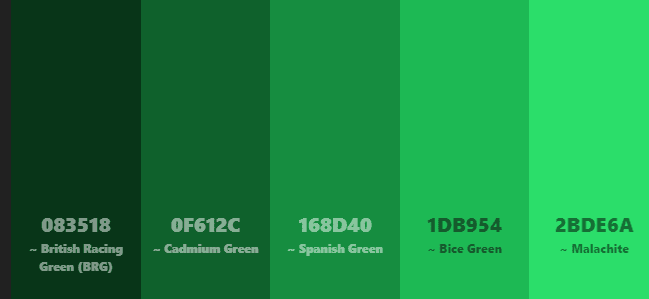
For Example: Spotify uses a yellow-green accent in its navigation menu, buttons, and icons. This creates a consistent brand identity while keeping the user interface clean and easy to navigate.
Hover Effects and Interactive Elements
Hover effects and interactive elements guide users through a website’s functionality, making navigation more intuitive. Intermediate colors in hover effects can provide subtle feedback that enhances user engagement. For instance, buttons may change from blue-green to blue-violet when hovered over, adding a smooth transition effect.
For example: Google’s design system applies intermediate color transitions to buttons and cards, ensuring users receive visual feedback when interacting with elements. This improves usability.
Product Showcases and Image Overlays
E-commerce and portfolio websites often use intermediate color overlays on images to create a sense of depth and focus. A semi-transparent blue-green overlay can make white text more readable, while a yellow-orange gradient can add warmth to product displays.
For example: Apple frequently highlights products using neutral tones combined with intermediate colors. Subtle gradients like blue-violet and gray overlays create a futuristic and premium aesthetic that aligns with the brand’s high-end image.
Read about: Best Font for Headings
3. How to Choose Intermediate Colors for Your Website?
Creating the right color palette with intermediate colors is essential as it helps enhance readability, navigation, and overall user experience.

Here’s how to select the best intermediate colors for your web design.
- Understand Your Brand Identity: Your website’s color scheme should reflect your brand’s personality and message. A tech company may opt for blue-green for a sleek, modern feel, while a wellness brand might choose yellow-green for a natural and calming vibe.
- Consider User Psychology: Different colors evoke different emotions. Red-orange can create excitement and urgency (great for e-commerce), while blue-violet exudes creativity and sophistication (ideal for portfolio websites).
- Ensure Accessibility and Readability: Contrast is key when choosing intermediate colors. When using primary and secondary hues or any color scheme, always ensure that text and background colors have sufficient contrast to make content easy to read, even for users with visual impairments.
Check out: Best White Label Web Design Companies for Agencies and Freelancers
4. Importance of Understanding Intermediate Colors for Web Designers
For web designers, color is more than just aesthetics. It influences user perception, emotions, and functionality. Understanding how to use intermediate colors can help create visually stunning, accessible, and engaging websites. These colors bridge the gap between primary and secondary colors, offering greater flexibility and depth in design.
Balancing Warm and Cool Tones
A well-balanced mix of warm and cool tones ensures that a website feels neither too overwhelming nor too dull. Intermediate colors also provide the perfect middle ground that allows designers to create a sense of harmony and contrast.
For example: A travel website may use blue-green for its backgrounds (evoking calmness and trust) while adding red-orange accents to highlight action buttons, creating a dynamic yet balanced interface.
Creating Emotional Impact
Colors trigger emotions, and intermediate colors allow for more nuanced emotional responses. By choosing the right intermediate color palette, designers can influence how users feel while navigating a website.
- Blue-green: This creates a calming and trustworthy atmosphere, which is great for finance or health websites.
- Yellow-orange: This feels friendly and energetic, making it perfect for e-commerce or lifestyle brands.
- Red-violet: This adds a sense of luxury and creativity, ideal for fashion or art-related websites.
Example: Meditation apps usually use blue-green and muted purples to create a peaceful and relaxing digital space.
Optimizing Accessibility
A well-designed website should be inclusive and accessible to all users, including those with visual impairments or color blindness. Choosing the right intermediate colors helps improve readability, contrast, and usability. Here are some tips to improve website accessibility:
- Avoid using low-contrast intermediate colors for text and backgrounds.
- Use high-contrast color pairings like blue-green text on a neutral gray background for better readability.
- Ensure that CTAs stand out by using complementary intermediate colors.
Example: Government websites like ADA.gov use accessible intermediate color contrasts to ensure compliance with web accessibility standards.
Related: Why Accessibility in Web Design Should Be a Focus
Enhancing Brand Recognition
Many brands use signature intermediate colors to stand out from competitors. A unique color palette helps create brand consistency across websites, apps, and marketing materials. A few examples include:
- Twitch uses blue-violet to represent creativity and digital entertainment.
- Fiverr uses yellow-green, giving a fresh and innovative feel.
- Slack combines blue-green and yellow-orange to create a fun yet professional brand identity.
Guiding User Attention
The strategic use of intermediate colors can direct users’ eyes to important elements like buttons, forms, and navigation links. Designers can use contrasting intermediate colors to highlight CTAs and guide user flow. Some tips include:
- Using blue-violet CTAs to stand out against neutral backgrounds.
- Red-orange banners draw attention to sales or important announcements.
- Yellow-green highlights can emphasize key content sections.
Example: E-commerce sites like Amazon use yellow-orange buttons for CTAs because they naturally attract attention.
Learn more: Common WordPress Website Design Mistakes to Avoid for Success
5. Design Tools for Choosing Intermediate Colors
Using color selection tools can help designers create balanced and aesthetically pleasing color schemes. These tools generate harmonious color combinations based on the principles of color theory.
- Adobe Color helps designers create custom color palettes using complementary, analogous, and triadic schemes.
- Coolors is a fast and user-friendly tool that generates beautiful color palettes with just a click.
- Canva Color Palette Generator allows you to upload an image and extract colors to create a custom intermediate color scheme.
- Google’s Material Design Color tool helps designers create modern, UI-friendly color palettes optimized for digital interfaces.
6. Uses of Intermediate Colors in UI/UX Design
Using Intermediate colors in UI/UX design helps improve functionality, readability, and user engagement. Here’s how they contribute to UI/UX design.
Navigation and Menus
Navigation menus should be clear and easy to use, guiding users through a website or app without confusion. Using subtle intermediate colors like blue-violet or muted teal for menus can also enhance usability without being too overwhelming or distracting.
- Dark blue-violet menus create a sleek and professional look for corporate websites.
- Muted yellow-orange side menus can add warmth to creative or lifestyle websites.
Example: Dropbox’s website uses blue-green accents in its navigation bar, making the UI clean, modern, and easy to navigate.
Form Fields and Input Boxes
Filling out forms should feel comfortable and effortless. Soft intermediate colors like yellow-green or pastel blue-green can create a visually pleasant experience, making users feel more at ease while inputting information.

- Yellow-green form fields provide a fresh, modern look while maintaining readability.
- Light blue-green input boxes give a sense of clarity and openness, reducing user fatigue.
Example: Slack’s UI uses blue-green accents for input fields, creating a modern and approachable interface.
Progress Indicators and Load Screens
Loading bars, progress indicators, and status updates are important elements in UX design. Using intermediate colors can make these elements visually engaging while maintaining a sense of flow.
- A red-orange progress bar creates a sense of urgency.
- A blue-green loading animation can feel smooth and calming.
Example: YouTube’s loading bar uses red-orange to maintain its brand identity while keeping users visually engaged.
Background Gradients and Section Dividers
Intermediate colors are perfect for background gradients and section dividers. They help create smooth transitions between different sections of a website or app.
- A blue-green to blue-violet gradient gives a futuristic and sleek look.
- A yellow-orange divider between sections can subtly highlight important content.
Example: Instagram’s interface makes great use of pink-orange and blue-violet gradients, giving the platform its signature modern and stylish appeal.
Know about: The Cost-Effectiveness of White Label Website Design Services
7. Practical Tips for Using Intermediate Colors in Web Design
Once you’ve selected your intermediate colors, applying them correctly is key to achieving a polished and professional look.
- Use a Primary, Secondary, and Accent Color: Choose a dominant intermediate color for consistency. Select a secondary color for contrast, and use an accent color for interactive elements like CTAs.
- Maintain Color Hierarchy: Ensure that important elements stand out. For example, a red-orange CTA button will naturally attract attention against a blue-green background.
- Keep it Simple: Avoid using too many intermediate colors in one design. Just stick to 3-5 colors to maintain a clean and cohesive look.
- Test Across Different Devices: Colors can appear differently on various screens. So, always test your chosen intermediate colors on desktop, mobile, and tablet to ensure consistency.
Bonus: Different Intermediate Color Schemes for Web Design and Examples
Intermediate colors offer versatility and can be applied in different ways to achieve specific design goals. Here are different intermediate color schemes and how they enhance web design.
Complementary Color Scheme
A complementary color scheme uses two intermediate colors that are opposite each other on the color wheel. This combination creates a high contrast, which makes elements stand out and adds energy to the design. A complementary color scheme is best for websites that need strong visual contrast, such as online stores, entertainment platforms, and news portals.
Tip: Use one color as the dominant shade and the other as an accent to maintain balance.
Example: E-commerce websites like Amazon use blue-green and red-orange to highlight CTAs, such as “Buy Now” buttons, ensuring they capture user attention immediately.
Triadic Color Scheme
A triadic color scheme consists of three evenly spaced intermediate colors on the color wheel. This method creates a lively yet balanced design, making elements pop without overwhelming users. It is ideal for design-focused websites, creative agencies, and entertainment platforms.
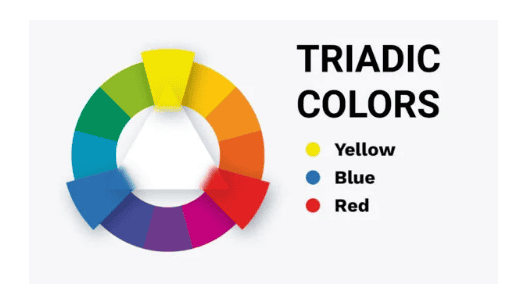
Tip: Choose one dominant color while using the other two for accents to maintain a cohesive look.
Example: Creative platforms like Adobe and Canva use yellow-green, blue-violet, and red-orange to create a visually engaging and energetic interface.
Analogous Color Scheme
An analogous color scheme consists of three adjacent intermediate colors on the color wheel. This approach creates a harmonious and visually smooth experience, making it ideal for brands that want a natural and calming effect. This color scheme is perfect for health and wellness websites, meditation apps, and personal blogs.
Tip: Ensure there’s enough contrast between the colors to avoid a washed-out look.
Example: Wellness and lifestyle brands, such as Headspace, use yellow-orange, yellow, and yellow-green in their UI to create a peaceful and inviting digital environment.
Split-Complementary Color Scheme
A split-complementary scheme takes one base intermediate color and pairs it with two adjacent colors of its complementary shade. This results in a vibrant yet slightly less contrasting effect than a standard complementary scheme. It is best for gaming, sports, and entertainment websites.
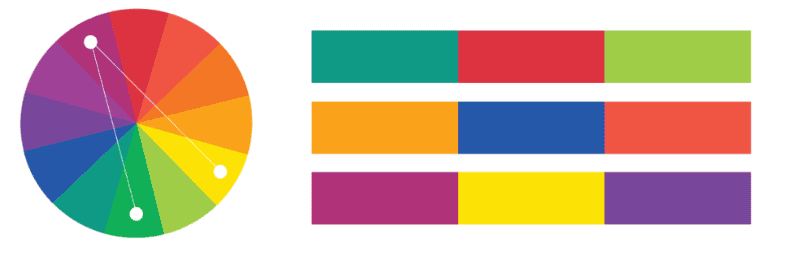
Tip: Use the complementary colors for highlights and interactive elements to maintain balance.
Example: Gaming websites like Twitch use blue-violet, yellow-green, and red-orange to create a high-energy interface that enhances user engagement.
Monochromatic Color Scheme
A monochromatic scheme focuses on different shades, tints, and tones of a single intermediate color. It is generally used by technology websites, corporate platforms, and minimalist designs. This approach provides a clean, modern, and professional aesthetic while maintaining simplicity.
Tip: Use varying shades to create depth and hierarchy in design elements.
Example: Tech brands like Apple and Samsung often use blue-green gradients in their UI to create a sleek and futuristic feel.
Tetradic (Double Complementary) Color Scheme
A tetradic scheme consists of two complementary color pairs, offering maximum contrast and diversity. When used carefully, this scheme adds depth and excitement to web design. This color scheme is best for high-energy, visually dynamic websites such as media, advertising, or online gaming.
Tip: Balance warm and cool tones to prevent overwhelming the user.
Example: Netflix incorporates visible colors like blue-green, red-orange, yellow-orange, and blue-violet for bold and eye-catching visuals.
Final Thoughts
Intermediate colors add depth, balance, and beauty to any visual composition. By understanding how they are created and used, you can make smarter color choices in website design. Whether you want to create a bold contrast, a soothing ambiance, or a unique color palette, intermediate colors give you endless possibilities. So, start experimenting with different hues today and discover the magic of in-between colors!